1.1.2.1. Move
- Numpad zero
Pressing the Numpad zero will pan the Visible Range, so that the playhead is at the center. You have to use the numpad, unless you have set
Emulate Numpadin the User Preferences.Hint
If you don’t have a 3 button mouse or a numpad (e.g. you are working with a tablet and stylus on a laptop), you can enable
Emulate 3 Button Mouseand/orEmulate Numpadin the User Preferences. You can use then the regular numeric keys. Pressing the MMB is simulated by pressing the Alt key (not Alt Gr) and the LMB (or pressing the stylus) together and drag.Warning
Aside from the menu View > Navigation > Goto Current Frame (= Numpad zero), there are no menu items that will move the Visible Range.
- MMB drag
Pressing the MMB and dragging left or right will pan the Visible Range horizontally. Dragging up or down will move the window vertically. It is not that important where in the sequencer you click (center, top left, …) because you can keep on dragging beyond the screen border. Of course, vertically, you cannot move further than channel 0, although it is possible to move beyond channel 32 (which is the highest channel you can put strips on).
- Ctrl - MMB + roll
Pressing the Ctrl MMB and roll with the wheel will pan the Visible Range horizontally.
- Shift - MMB + roll
Pressing the Ctrl MMB and roll with the wheel will pan the Visible Range vertically.
- Scrollbars
You can also use the horizontal or vertical scrollbars to move the Visible Range. Click at the scrollbar (not the circles) and drag. The width and location of the horizontal scrollbar gives you an indication of how much and what area the Visible Range occupies in the Strip Range (see below). The behavior of the scrollbars is somewhat counter-intuitive because it is based on the Strip Range.
Note
The Strip Range is calculated as follows:
Horizontal: from Start to End (by default this is from frame 1 to frame 250)
Vertical: from channel 0 to 7.
This range is extended by any strip outside this range. So, if you add a strip at frame 400 and channel 9, the Strip Range will be extended to frames (0 - 400) and channels (0 - 9).
Please note that, if you set your project End at frame 10 000, the horizontal scrollbar will be very small, even if you only have strips.
Figure 2 shows a project with a span of 100 frames (Start=1; End= 100). Since there are no strips, the Strip Range runs from frame 1 to 100 and from channel 0 to 7 (but this is irrelevant in this example).
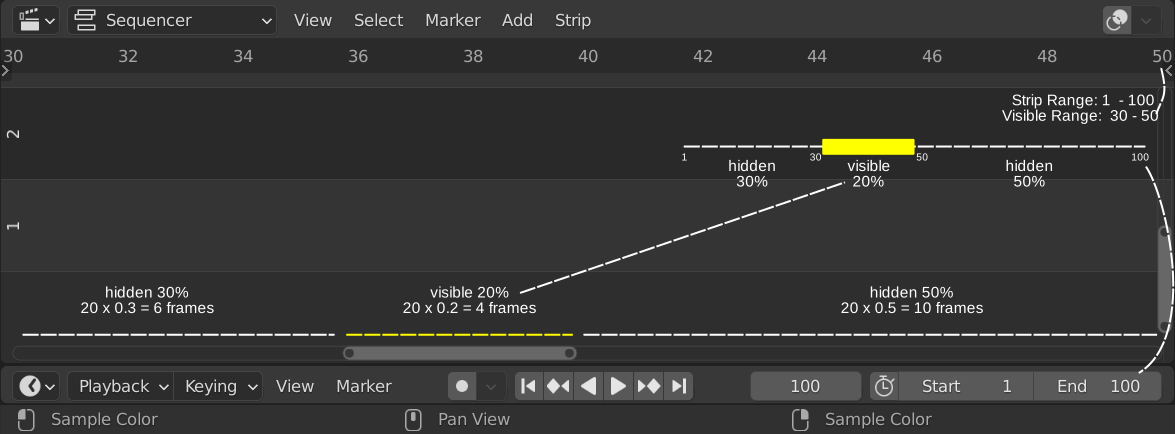
Figure 2: Horizontal scrollbar in Sequencer
Because the Visible Range covers only frames 30 - 50, 80% of Strip Range will be hidden (30% from the Start and 50% from the End). Only 20% of the Strip Range is visible. The scrollbar hints to this: the length covers 4 frames. This is 20% of 20 frames, which is the length of the Visible Range. The scrollbar starts at frame 36, which is 6 frames or 30% from the start.
Dragging with the little circles at both ends of the scrollbar will zoom in or out. We discuss this behavior in the next section.